Overview
Steelframe turns one repository into a software factory: an agent that runs issues from intake and planning through implementation, review, staging, and production. The opinionated harness — hooks, skills, and gates — is one component on that floor. The coding CLI (Pi) is a tool the agent spawns — it is not the agent, and it never owns the loop.
Point an agent at one GitHub repository. It picks up issues, implements changes, deploys to staging, verifies with health checks, and promotes to production — with an audit trail and safety gates around every step.
The factory floor
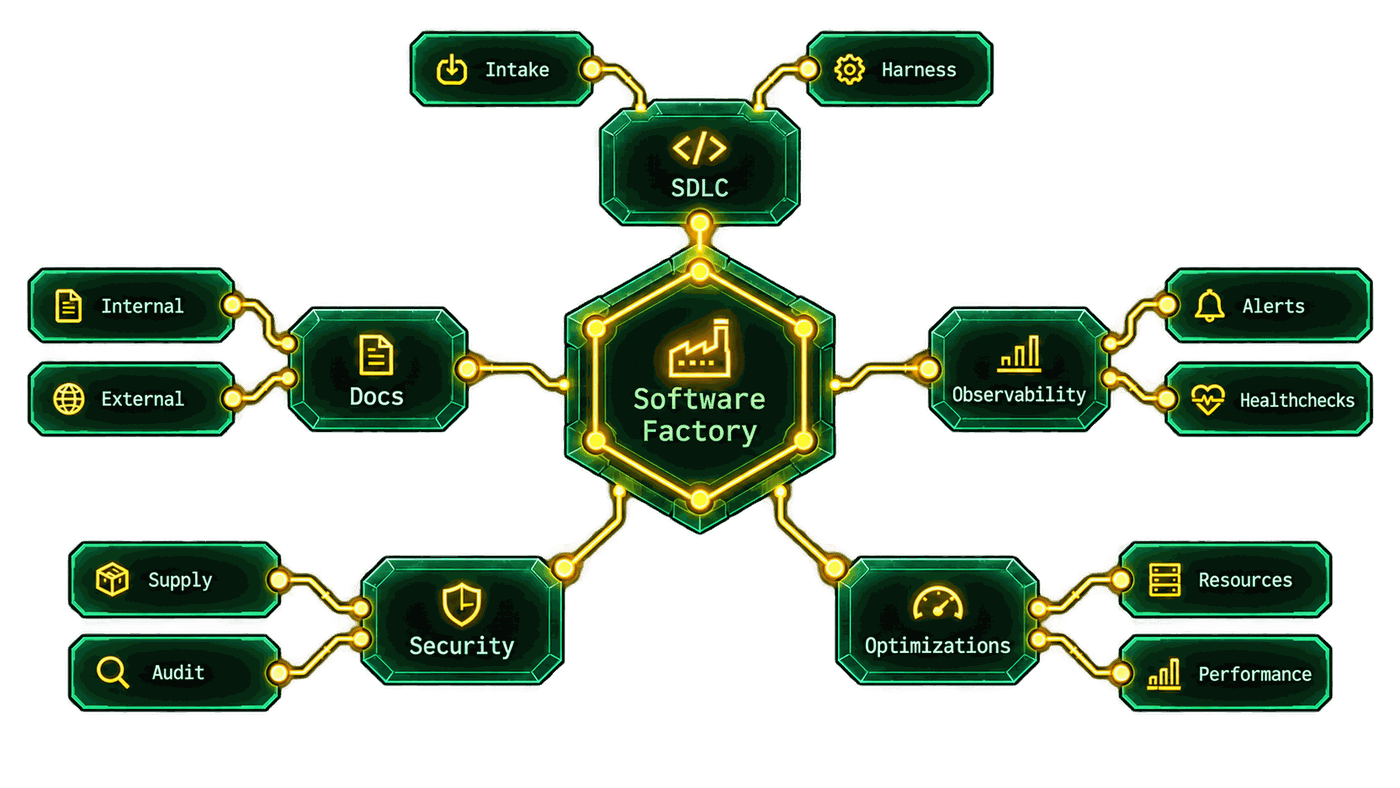
Section titled “The factory floor”The factory is not one loop with a chat window on top. Five systems keep it running around the work, and the agent ships all five — you configure them, not assemble them.
| System | Covers | In Steelframe |
|---|---|---|
| SDLC | Intake and the harness: feature branches, gates, staging before production, explicit promote | task_lifecycle, the harness pack, harness_converge |
| Docs | Internal docs (README.md, docs/, committed memory) and this site | the docs contract, docs_converge |
| Observability | Environment health, alerts, and the historical rollup | health checks, production_monitor, Dashboard, Analytics |
| Security | Supply chain, audit, and periodic source audits | supply-chain skills, the audit log, pentest |
| Optimizations | Worker capacity and performance findings | optimize_performance, capacity keys, token usage |
The work loop
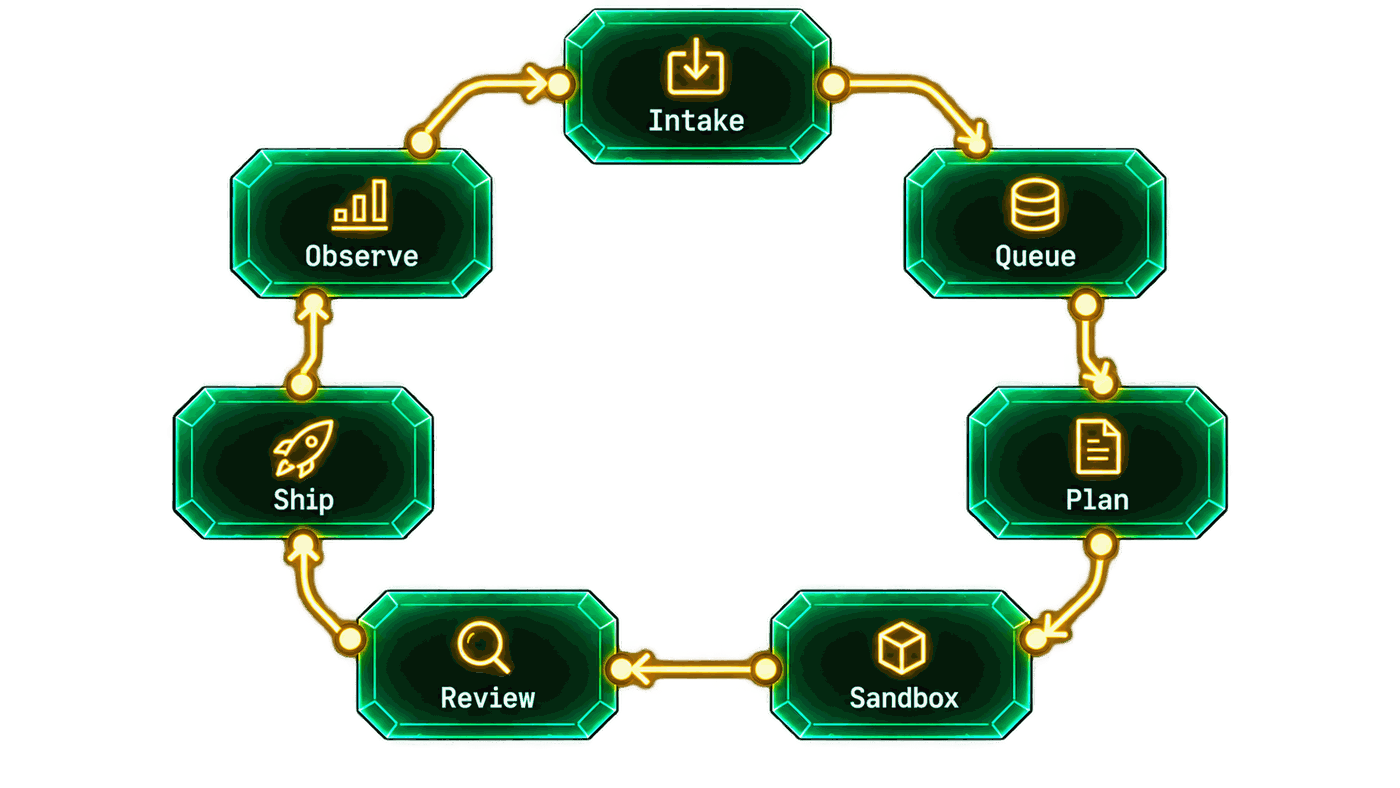
Section titled “The work loop”Every request moves through seven stages. The engine’s concrete steps are in Workflows; these stages are the shape you see on the Board and Dashboard.
| Stage | What happens |
|---|---|
| Intake | A request enters the factory. External requests land in the Board’s Intake column; a labeled GitHub issue is picked up by github_sync on its next poll (see GitHub sync). |
| Queue | Admission, not idling. The agent checks worker slots, run capacity, and the memory floor before it starts a task, and fails closed when occupancy cannot be read. A labeled issue can sit Queued until a slot frees (Dashboard). |
| Plan | Triage shapes the run from the issue, skills, committed memory, and retrieve hits. The agent can park the task (steelframe:needs_human), wait for an answer (waiting_for_info), or accept a Decision comment (Chat, Memory). |
| Sandbox | A throwaway clone. Pi implements on an sf/<issue>-<slug> feature branch in a sandbox — local or remote — and checkpoints its work while it runs (Sandbox providers). |
| Review | CI and review. The PR waits on CI, while the agent reviews PRs it did not open. Merge needs green CI and, where the branch ruleset requires it, one approving review on the current head (Workflows). |
| Ship | Landing and promotion. The landing queue rebases, verifies, and merges one PR at a time; the branch is deployed to staging and gated by required health checks; production promote is explicit. A post-deploy failure opens a revert PR (Health checks). |
| Observe | production_monitor samples the checks and escalates to investigate_incidents when a threshold is crossed; alerts go to the configured Discord channel, and Analytics rolls up sessions and tokens. Findings become new pickup issues — the arrow back to Intake. |
The picture is the loop, not the literal step list: triage can park a task, a
red CI check starts a fix worker, and a red production gate reverts. A run that
fails terminally is parked with steelframe:needs_human; start again from a new
issue rather than retrying in place.
delivery_profile=source short-circuits Ship: once CI is green the PR is
rebase-merged to main and the task is done, with no staging or production
deploy.
The pieces
Section titled “The pieces”| Piece | Role |
|---|---|
| Agent | Per-project process: workflow engine, GitHub, credentials, skills, safety checks, and coding-runtime workers. This is the autonomous system. |
| TUI | Terminal multi-project console that connects to agents. |
| GUI | Multi-project graphical console (Desktop native + Web). It connects to agents. |
| Desktop | The native target of the GUI. Uses projects.toml + a token, like the TUI. |
| Web | The browser target of the GUI. One agent behind the GUI origin; hosted on the release channel, not served by the agent. |
| Coding runtime | Pi — the only worker CLI the agent spawns (legacy config values resolve to Pi). |
One agent instance serves one project, typically on a dedicated VM.
Multi-project is a TUI and Desktop concern (~/.config/steelframe/projects.toml
plus a per-project token). Web is one agent behind the GUI origin.
TUI / GUI ── HTTPS ──▶ agent (127.0.0.1:7700 behind nginx) axum + Turso (libsql) workflow engine coding-runtime workers × N gh / GitHub App │ GitHub (issues, PRs, Actions)One issue, end to end
Section titled “One issue, end to end”- You open a GitHub issue in the repository the agent manages, with a thorough
specification. If pickup labels are configured, add one (for example
steelframe:work-on-this). - The agent picks up the issue and runs it through the
task_lifecycleworkflow: triage, implement on asf/<issue>-<slug>feature branch, open a PR, wait for CI, deploy the PR branch to staging, run health checks, then merge and deploy to production. - If the agent needs clarification it comments on the issue and waits. If the
task fails it is parked with
steelframe:needs_humanand a notification. - Every step transition, decision, and mutation lands in the audit log.
Where to go next
Section titled “Where to go next”- Getting started — install and run your first agent.
- Install — the unified binary, setup, and systemd.
- Run — agent lifecycle, config, and auto-update.
- Consoles — TUI, Web, and Desktop.
- Features — chat, dashboard, board, workflows, memory.
- Operations — auth, deploy, releases, multi-project, agent sentinel.
- Reference — HTTP API, config keys,
projects.toml, CLI.